Your AI Traffic Is Already There. GA4 Just Can't See It Yet.
AI engines like ChatGPT and Perplexity are already sending traffic to your site — but GA4 only shows you a fraction of it. Here's what you're missing and how to track AI referral traffic with a custom channel group.
Your AI Traffic Is Already There. GA4 Just Can't See It Yet.
📋 TL;DR
- GA4’s default channels were not built for AI search: clicks from ChatGPT, Perplexity, and similar surfaces often land in Referral, Direct, or (not set) — not in a dedicated AI channel.
- Referrer data is incomplete: only some AI links pass attribution; mobile, AI Overviews, and copy-paste journeys strip or obscure the trail.
- Branded organic can hide AI: users get a recommendation from an LLM, then search your name on Google — GA4 credits organic, not AI.
- Fix (partial but real): create a GA4 custom channel group with an AI Search channel and a source regex so attributable AI clicks surface in standard reports.
- Expect a floor, not a ceiling: the channel group shows click-level AI traffic with referrers; it cannot measure zero-click influence or full funnel AI impact.
Watch on YouTube if the embed does not load.
Why GA4 Misses Most AI Traffic
GA4 was built before AI search matured. Default channel definitions have not kept up with how people discover content in 2026.
When someone asks ChatGPT a question, clicks a link, and lands on your site, GA4 often lumps that visit into the generic Referral channel alongside Reddit, forums, and miscellaneous backlinks. That is only the traffic that clicked with a usable referrer.
ChatGPT began appending attribution data to some citation links in June 2025. Google AI Overviews, AI Mode, many mobile app handoffs, and a large share of LLM responses still pass no reliable attribution.
The result: AI visitors get scattered across Referral, Direct, and (not set) — and many sessions are impossible to label as AI from traffic data alone.
The Direct traffic problem is bigger than people think.
If Direct has grown over the last 12 months without a clear cause, AI is often part of the story. When someone uses ChatGPT on mobile, copies a link, or follows a recommendation outside the AI interface, the referrer can be stripped. GA4 records Direct. You cannot tell from that row alone that an AI assistant sent the intent.
The custom channel group below will capture some of your AI traffic — not all of it. Treat it as a labeled subset of reality.
Then there is behavior GA4 cannot attribute at all.
A pattern we see often: someone asks ChatGPT for the best tools in a category. The model offers three brands. They do not click any links. They open a new tab, search a brand name on Google, and land on your site from branded organic.
That session looks like a win for SEO. It may convert. But nothing in GA4 ties it to the AI recommendation — there is no click path to stitch.
That is the hidden influence layer: AI shapes decisions before your site gets a session. GA4 measures sessions, not saw you in the answer. Search Console does not close that gap either. Understanding presence inside the assistants themselves is a different measurement problem — one we will touch on at the end.
For now, here is what you can do in GA4 today.
How to Create a GA4 Custom Channel Group for AI Traffic
This takes about 15 minutes. No code and no Tag Manager — GA4 Admin only.
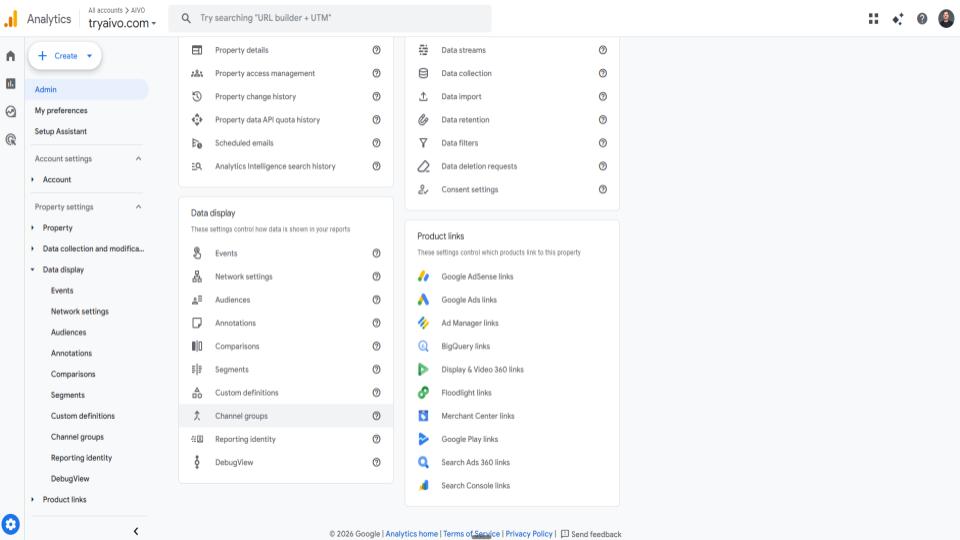
Step 1 — Open Channel Groups
Go to GA4 → Admin (gear icon, bottom left) → Data display → Channel groups.
Step 2 — Create a New Group
Click Create channel group. Name it AI Traffic (2026) — you will want to revisit the regex as new platforms appear.
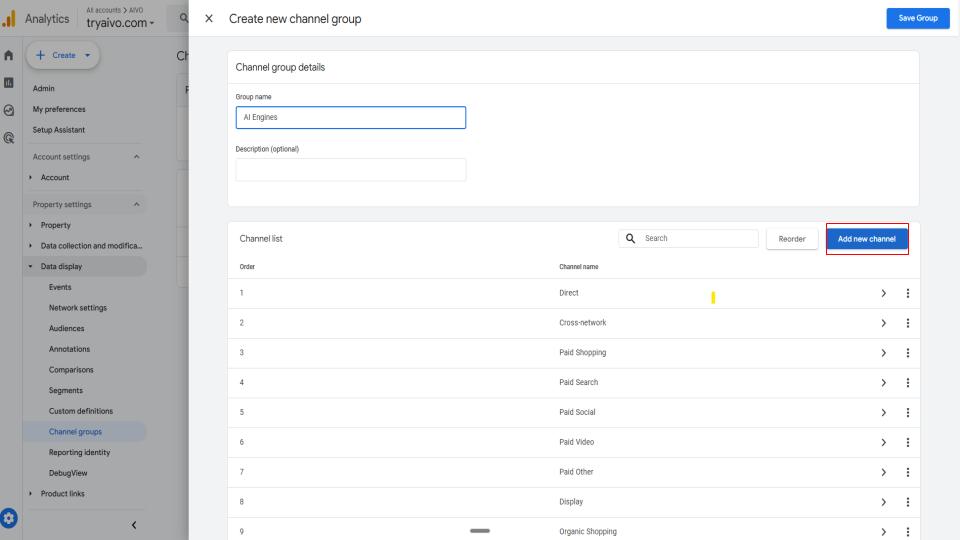
Step 3 — Add a New Channel
Click Add channel. Name it AI Search. Set the condition to Source matches regex. Then paste:
___PROTECTED_BLOCK_0___
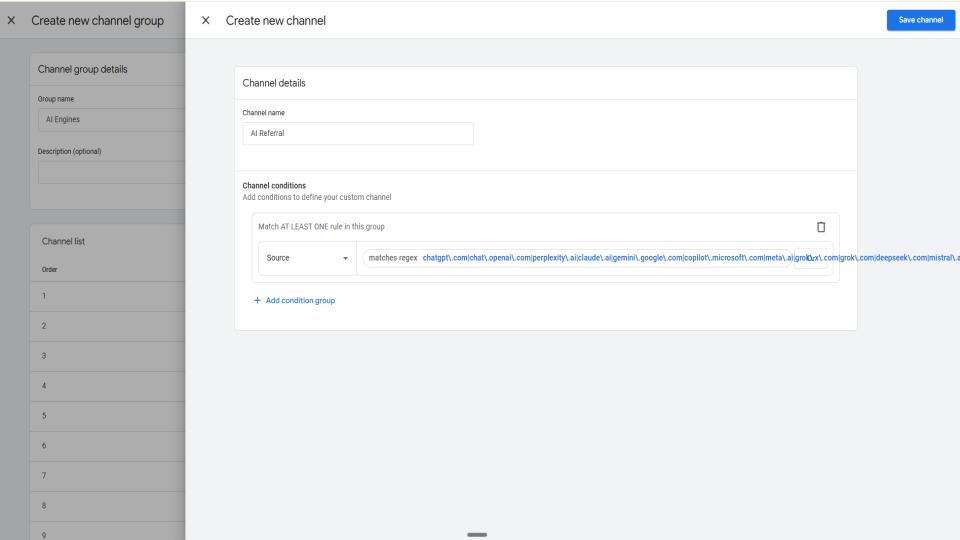
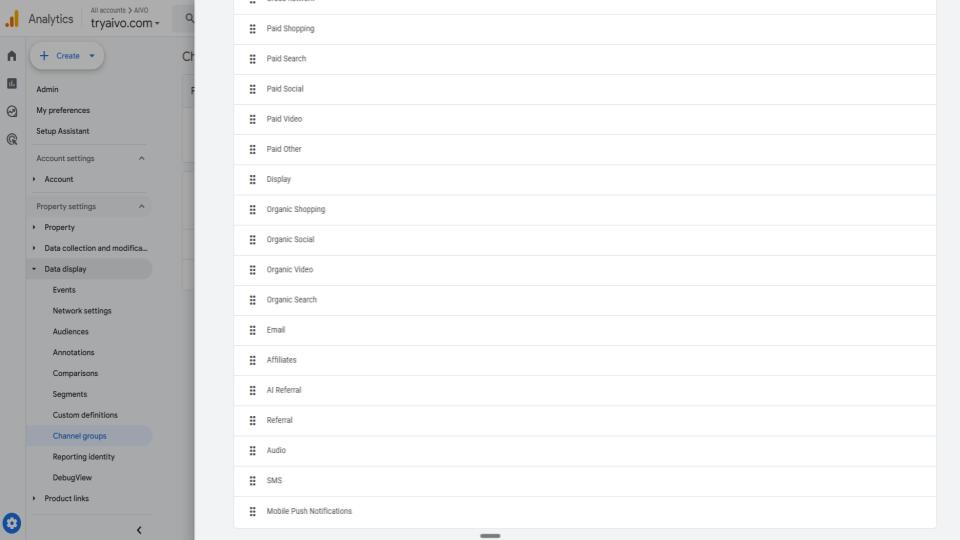
Step 4 — Move AI Above Referral
GA4 evaluates rules top to bottom. If AI Search sits below Referral, AI sessions can match Referral first and never hit your new rule.
Drag AI Search above Referral, then save.
Step 5 — Check Your Reports
Go to Reports → Acquisition → Traffic acquisition. Open the channel group dropdown, switch from Default channel grouping to AI Traffic (2026), and look for the AI Search row.
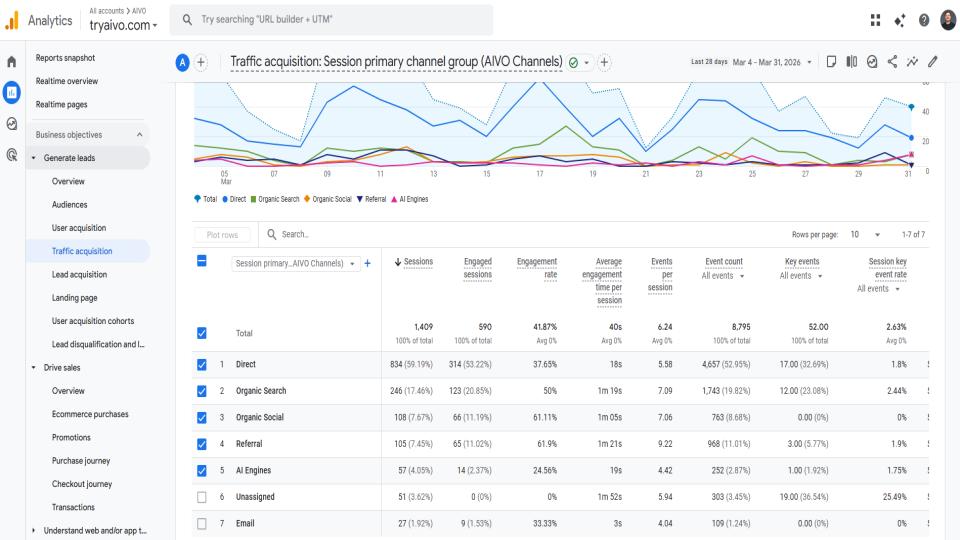
Important: custom channel groups apply from the date you create them — they do not backfill history in the same way as a retroactive dimension rewrite. For historical views, use Explorations and session-scoped filters as needed.
What You'll See — And What You Won't
Once the group is live, you can see which AI-related sources drive sessions, which landing pages they hit, and how those sessions convert relative to other channels.
Conversion quality matters: Perplexity and other AI-sourced visits sometimes convert at much higher rates than average organic in third-party studies — low volume, high intent. These users often arrived with a recommendation already in mind.
Stay honest about what the report shows.
You are seeing AI traffic that clicked and passed identifiable source data. You are still not seeing:
- Many mobile ChatGPT journeys without referrers
- AI Overview clicks attributed to Google organic
- Users who got a recommendation then searched your brand on Google
- Zero-click mentions — the most common AI interaction for many brands
The Bigger Picture
GA4 tells you who clicked. It does not tell you who saw you in an answer.
If you need to know how often your brand appears across ChatGPT, Perplexity, Gemini, Claude, and Google AI Overviews, how competitors show up in the same prompts, and where the gaps are — that is AI visibility intelligence, not session analytics. That is what we built AIVO for.
Setting up this GA4 channel group is the right first step. Do it this week. Treat it as the start of the measurement story, not the end.
Start with a free Book an Intro — it shows how your brand appears across major AI engines in minutes. Prefer a walkthrough? Book 30 minutes with us and we will map it to your stack.
FAQ
Q: Why does AI traffic show up as Direct in GA4? A: Many AI-to-site paths strip the HTTP referrer — for example copy-paste, in-app browsers, privacy settings, or redirects. When GA4 has no referrer and no campaign parameters, it often classifies the session as Direct even though an assistant influenced the visit.
Q: Will a custom channel group fix all AI attribution? A: No. It only re-labels traffic that already has a session source matching your regex (or whatever rules you define). It does not recover missing referrers or attribute branded organic searches that followed a zero-click AI recommendation.
Q: Do custom channel groups backfill historical data? A: They apply from configuration forward in standard reports. For past periods, use Explorations or export raw event data and apply the same logic offline if you need a longer view.
Q: How often should I update the source regex? A: Whenever a meaningful new assistant or domain sends traffic — the list in this post is a starting point, not a permanent standard. Version the channel group name (for example AI Traffic (2026)) when you make material changes so analysts know what changed.
Key Takeaways
- GA4 under-labels AI-influenced demand by default; Referral, Direct, and (not set) absorb much of the signal.
- A custom AI Search channel with source regex, ordered above Referral, surfaces attributable AI clicks in Traffic acquisition.
- Direct growth without explanation may partly reflect AI-assisted journeys with no referrer.
- Branded organic can mask AI-shaped intent when users search after a recommendation instead of clicking from the assistant.
- Session analytics and AI visibility tracking solve different problems — use both for a complete picture.


